

The sign-up page is branded to the card: it uses the card’s colours, logo, and name, so it looks like your program, not a generic form. Your logo is centred automatically, with the empty space around it cut away.
The customer’s steps
Loyalty cards live in a phone wallet, so sign-up happens on a phone. If a customer opens the link on a computer, the page shows a QR code and the message “Add this card to your phone”, they scan it to continue on their phone.
1
Open the sign-up page
On their phone, the customer scans the QR code or taps the link. The page opens with your card’s branding at the top.
2
Fill in the form
They fill in the fields you set up on the card. This can be as little as a first name and email, or more (last name, phone, date of birth, a choice list, a photo, or your own custom fields), depending on how you built the sign-up form.
3
Agree to the terms
They tick a single checkbox that reads I agree with Terms and GDPR, where each is a link they can open. If your card links your own loyalty programme rules, the same tick reads I agree to the Terms, GDPR and the loyalty programme rules, with your rules as the third link. This tick is required.
4
Add the card to their wallet
They tap Add to Apple Wallet (iPhone) or Add to Google Wallet (Android). A confirmation screen shows “Card successfully added”, and the card is now in their wallet.
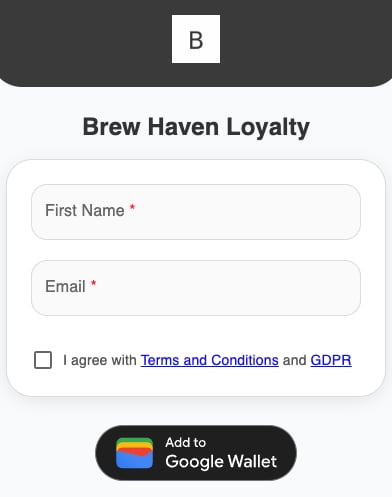
The customer sign-up page