

The principle: OBERON decides how many points a purchase earns. VEXiON decides what a point is worth, what discount the customer gets, and keeps the balance. There is no product table to fill in on the VEXiON side, which is the main difference from Dotykačka, Storyous and Papaya.
What is supported
The settings
Open Settings → Integrations → OBERON. Under Integration Settings you have three settings: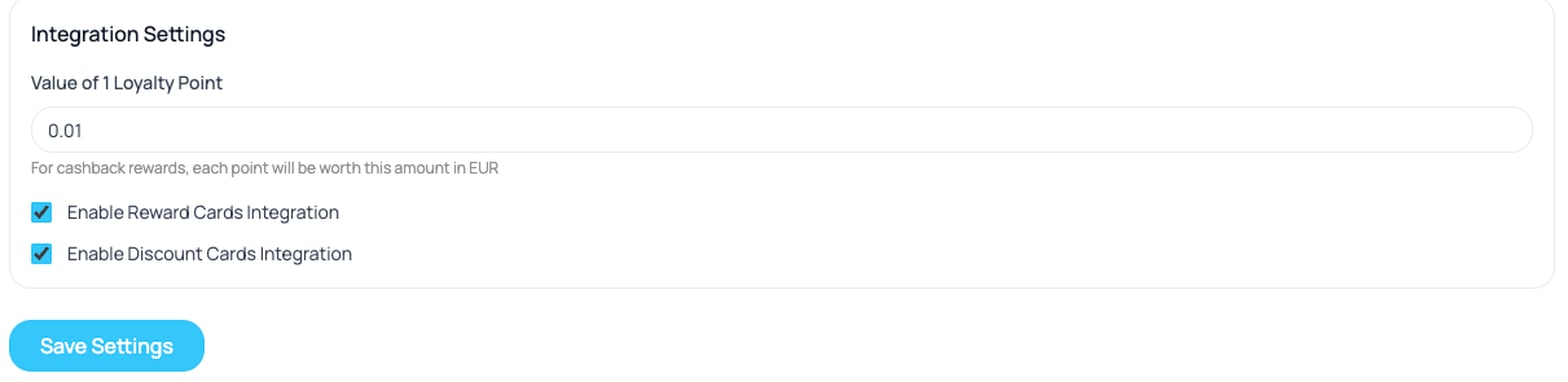
The OBERON card settings
A change reaches a till the next time it signs in to VEXiON, which can take up to 4 hours. Restart OBERON or sign the till out to apply it at once. A till that scans a card of a switched-off type gets no benefit back, so only switch one off if you genuinely do not want those cards honoured at the till. The same delay applies to a changed Value of 1 Loyalty Point.
Which OBERON setting to use
One setting in OBERON decides whether a sale ever reaches VEXiON at all. It is on the loyalty system record, tab Nastavenia, in the group Kumulovanie vernostných bodov: the dropdown Kumulovanie benefitov, and below it the checkbox Pri čerpaní benefitov umožniť súčasne aj kumulovať benefity.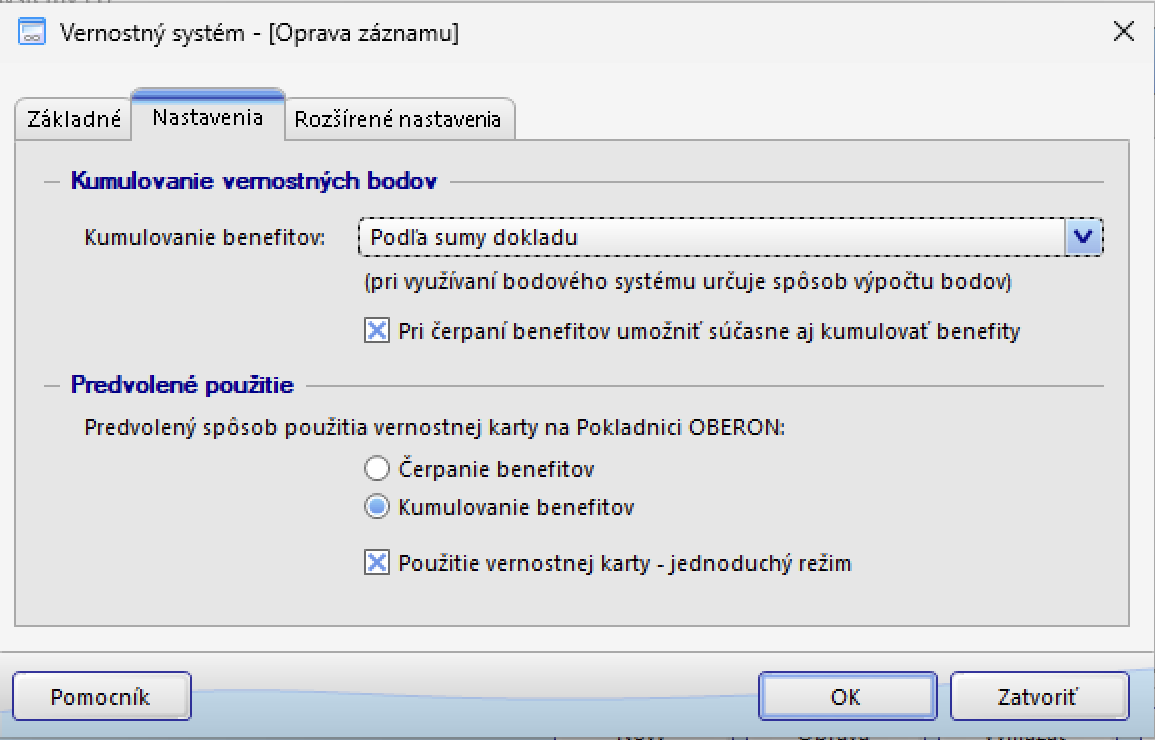
Tab Nastavenia, set up for a discount card
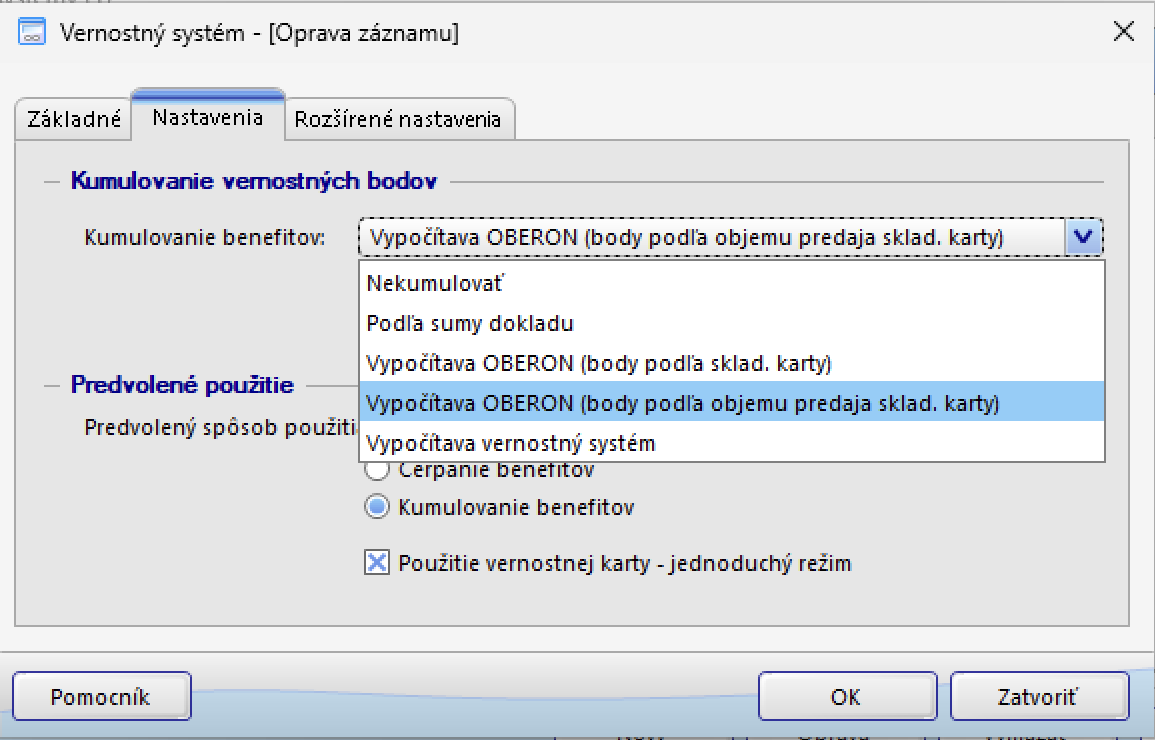
The five options in Kumulovanie benefitov
On a discount card
Set Kumulovanie benefitov to Podľa sumy dokladu and tick Pri čerpaní benefitov umožniť súčasne aj kumulovať benefity. Every paid bill with a card on it then reports its total to VEXiON once, when the bill is paid, carrying the receipt number, and it does so for every tier including 0 %. That last part is the reason for the setting: without it a customer on the entry tier never accumulates anything and so never moves up.Vypočítava OBERON (body podľa objemu predaja sklad. karty) also reports the bill total at payment and VEXiON counts it the same way. The point figure OBERON works out alongside it is ignored on a discount card.
Once your till has sent its first paid bill, applying the discount on an open bill counts nothing until the bill is paid. A paid bill is what Podľa sumy dokladu sends. A bill that is abandoned after the discount was applied adds nothing to the customer’s total. Before that first paid bill, applying the discount can already count the bill toward the customer’s spend.
On a reward card
Both settings work for reward cards. They differ in what OBERON counts:
VEXiON credits the points OBERON sends, so the choice here IS your earning rate. If the reward card is a cashback card with levels, VEXiON multiplies the points OBERON sends by the customer’s tier multiplier before crediting them.
Predvolené použitie
Leave it on Kumulovanie benefitov. Scanning a card then attaches the customer, and the cashier applies a discount or a redemption with Čerpanie benefitov when it is wanted.Reward cards
The customer collects points and spends them as money off a later bill.Cashback on this till
OBERON counts points, and the Value of 1 Loyalty Point setting turns them into money. The customer still sees credit in your currency on the card and in every message. With a point value of 0.05 €, 160 points show as 8,00 € of credit (at 0.25 Kč per point, 160 points show as 40 Kč).What a point is worth
The Value of 1 Loyalty Point setting converts points into money. At the default0.01:
The redemption reaches the receipt as a fixed-value discount, not a percentage, which is why it can be any amount up to the customer’s balance.
Which point value applies
VEXiON checks in this order and uses the first one it finds:- The Value of 1 Loyalty Point in these OBERON settings
- The point value set on the card itself
0.01as the final fallback
Where the earned points come from
This is the part that surprises people. VEXiON does not calculate the points earned on an OBERON sale. OBERON calculates them, sends the number, and VEXiON records it against the card. The one exception is a cashback card with levels, where VEXiON applies the tier multiplier to the number OBERON sends. The earning rate is therefore set in OBERON, on the loyalty system record, tab Nastavenia. Which value to choose is covered in Which OBERON setting to use above.Setting the point values up in OBERON
Because OBERON does the calculating, the per-product point values live on the OBERON side, not in VEXiON. These paths come from OBERON’s own help:
That last one is worth knowing about: OBERON can disable manual discount entry and manual customer selection at the till, so staff have to scan the card rather than key a discount in by hand. If you want your loyalty numbers to mean something, turn it on.
If you run another loyalty system alongside VEXiON, OBERON decides which system a card belongs to using the Automatická detekcia vernostného systému field, which takes a regular expression matched against the card number. Your OBERON supplier can set this up.
Discount cards
The customer gets an automatic percentage off, decided by their tier. Nothing is collected and nothing is redeemed, the discount simply applies. Tiers are set on the card in VEXiON, not in OBERON. For example:
The customer’s tier is worked out from their total spend and moves up on its own. Spend is summed across all your shops, so a customer earning their way to Gold in one shop gets Gold in every shop.
On the receipt this arrives as Zľava na doklad v percentách, a percentage discount on the whole document.
FAQ
How many card types does OBERON support?
How many card types does OBERON support?
Two: reward cards and discount cards. Stamp cards and gift cards are not supported through OBERON.
My customers earn zero points on every sale
My customers earn zero points on every sale
Almost always the Kumulovanie vernostných bodov setting in OBERON. VEXiON records the point count OBERON sends, so OBERON has to be the one calculating it. Check that setting first, then check that Enable Reward Cards Integration is switched on in the VEXiON settings.
I changed the point value. What happens to existing balances?
I changed the point value. What happens to existing balances?
Nothing changes about the balances, but every existing point is now worth the new amount. A customer sitting on 2000 points is worth 20 € at
0.01 and 200 € at 0.10.