


The Billing tab
All prices on this page are shown excluding VAT. The applicable VAT is added on top at checkout, based on your billing country.
The two plans
VEXiON cards ONE: 20€/mo
For a single shop getting started. Includes 1 card, up to 200 customers, and 1 location. Push notifications are included. Billed monthly.
VEXiON cards PRO: from 45€/mo
For growing and multi-location businesses. Unlimited cards and customers, POS integrations, multi-location, team members, automations, physical gift cards, and more. Billed monthly or annually. 45€/mo covers one location, and each further store costs less than the last, see per-location pricing.
Annual PRO saves 25% on whatever your subscription comes to. For a single location that is 405€/year instead of 540€, about 34€/month. When you upgrade, any unused time on your current plan is credited automatically, so you only pay the difference for the rest of the period.
If you run more than one store, the plan picker does the maths for you: it shows the total for all your locations, not the price of one. An eight-store business sees 240€/mo on monthly PRO, or 2 160€ per year on annual, which the dialog also shows as 180€/mo.
What the plan card shows
The main card on the Billing tab shows your current plan, whether you are monthly or annual, your payment method, your next billing date, and your usage (cards and customers). Any active discount is shown here too. From it you can:- Subscribe: if you have no active subscription, pick a plan and interval and check out on the secure payment page hosted by Stripe (you can enter a promo code there). If your account has outgrown ONE, that tile is greyed out and PRO is preselected.
- Upgrade to PRO: move from ONE to PRO, monthly or annual.
- Switch to annual: move a monthly PRO to annual and start saving.
- Manage billing: open the secure Stripe customer portal to update your payment card. Your legal invoicing details are edited on the Billing tab itself, see Invoices & billing details.
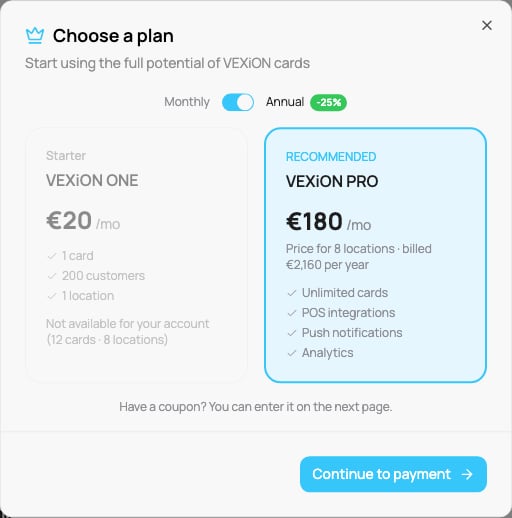
VEXiON cards ONE unavailable for an account that has outgrown it, shown on the annual toggle
Changing your plan
- To upgrade (ONE → PRO), click Upgrade to PRO, choose monthly or annual, and confirm. Proration is automatic.
- To switch a monthly PRO to annual, use Switch to annual. If your bank asks you to confirm the payment, the payment window opens (see Paying for a location). The plan changes to annual when the payment is confirmed.
- To change your card, use Manage billing to open the Stripe customer portal.
- To change the legal details on your invoices, use Edit details on the Billing tab, see Invoices & billing details.
Need to add stores? PRO prices each location on a graduated scale, see Per-location pricing. Running a franchise? See Delegated billing.