

This is the overview. The other Dotykačka guides cover connecting and setup, multi-cloud (multiple branches), card types and point setup, and working at the till.
What the Dotykačka integration is
It links your VEXiON loyalty program to your Dotykačka POS. The main features:- Simple connection: sign in with your Dotykačka account, no manual keys.
- Automatic point collection: points are collected on every sale.
- Multiple branches (multi-cloud): one loyalty program across the locations where the card is enabled.
- Everything in Dotykačka: points and their redemption are set up on products you already know.
Benefits
How it works
The key idea: in Dotykačka you set a point value on your products once. From then on, the customer just needs to be scanned onto the bill to earn those points, and to spend them, staff add a special product. VEXiON stays in sync because Dotykačka sends it an order webhook after each paid bill.Step by step
- Assign the customer to the bill, staff scan the QR code from the customer’s wallet (or find them by name/phone). The bill does not need to be open first, and the scan can happen before, during, or after adding items.
- Staff add products. Each product has the point value you configured, so the customer earns those points automatically once the bill is paid.
- Redeeming (optional, and manual):
- Cashback: staff add the special “Points redemption” product and enter the points to spend (say 500). It adds a negative line that reduces the bill (for example 500 points × 0.01€ = 5€ off).
- Stamp reward: staff add a reward product that has negative points and 0€ price (for example -10, for the 10th coffee free).
- Discount cards are different, the percentage discount applies automatically from the customer’s discount group.
- The customer pays, the bill closes.
- Dotykačka sends the order webhook to VEXiON, which processes it and updates the card in the customer’s wallet (points/stamps earned, and any redemption deducted).
Points and stamps are earned automatically (from the product point values) but redeemed manually (staff add the special product). Only percentage discounts apply fully automatically.
Redeeming a reward
If the customer has earned a reward (for example the 10th coffee free):- Staff see the customer’s points/stamps balance.
- They add the reward product to the bill (for example “Free coffee”).
- The reward product has negative points set on it, which are deducted automatically.
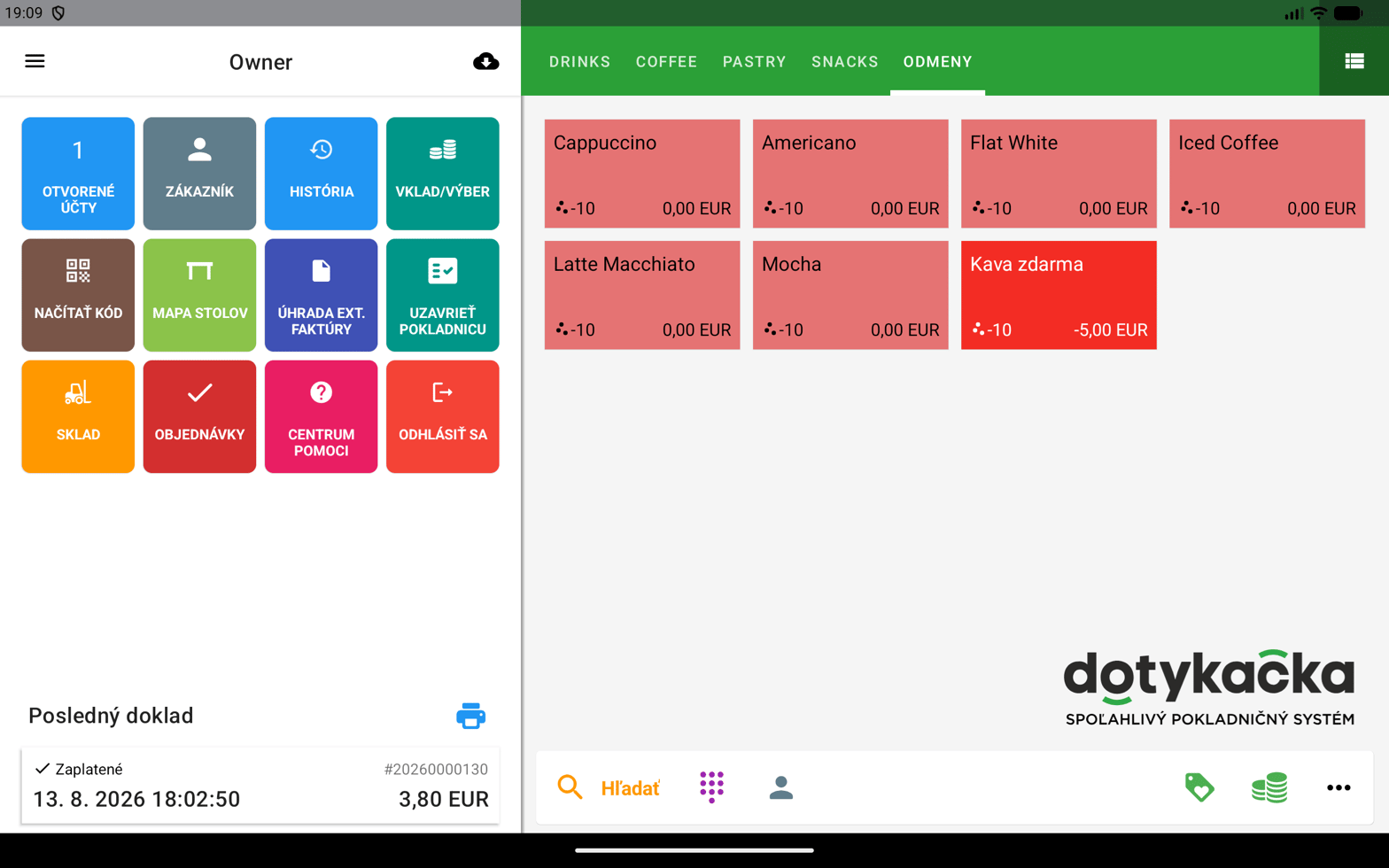
Reward products in Dotykačka, each set to -10 stamps
Supported card types
Stamp card
Stamp card
Combined setup: first in VEXiON, then in Dotykačka. In VEXiON you create the card and set how many stamps earn a reward (say 10). In Dotykačka you set stamps on your products and create reward products.Important: the reward’s negative stamps must match the card’s setting. An 8-stamp card needs a -8 reward; a 12-stamp card needs -12.
Reward card (credit / cashback)
Reward card (credit / cashback)
Set up entirely in Dotykačka. Points convert to a euro discount. You set how many points each product earns, and create a special “Points redemption” product where you define the value of one point (for example 1 point = 0.01€). At the till, staff add that product, enter the points to spend, and the discount is spread across the bill.
Discount card
Discount card
Set up in VEXiON, synced automatically to Dotykačka. You define the customer tiers and discount percentages in VEXiON; the discount groups are created automatically in Dotykačka, named
VEXiON: {Card name} - {Tier}. As a customer’s spend reaches a higher tier, they move up and their Dotykačka discount group updates on its own.Gift card
Gift card
Uses Dotykačka’s customer credit. The buyer fills in a form online or at the counter, a customer account is created for the buyer in Dotykačka, the paid amount (plus any bonus) is credited, and the card goes to the buyer or to the recipient they choose after paying. At the till they pay with Customer credit and the amount is deducted. If the credit is not enough, they top up the difference in cash or card.
Requirements and licences
You need:Quick start
Before you start, check you are on VEXiON PRO, you have a NAPLNO or NEOBMEDZENE Dotykačka licence, access to Remote administration, at least one VEXiON card, and are signed in to VEXiON admin.1
Connect to Dotykačka
In Settings → Integrations, expand Dotykačka, choose your settings, and click Connect to Dotykačka to sign in with your Dotykačka account.
2
Map your locations
After connecting, map each Dotykačka branch to a VEXiON location.
3
Set up products in Dotykačka
- Stamp / point cards: set the points on your products.
- Discount cards: the discount groups are created automatically.
- Gift cards: enable customer credit.
4
Done
The integration is active. See Connecting and setup for the full walkthrough.