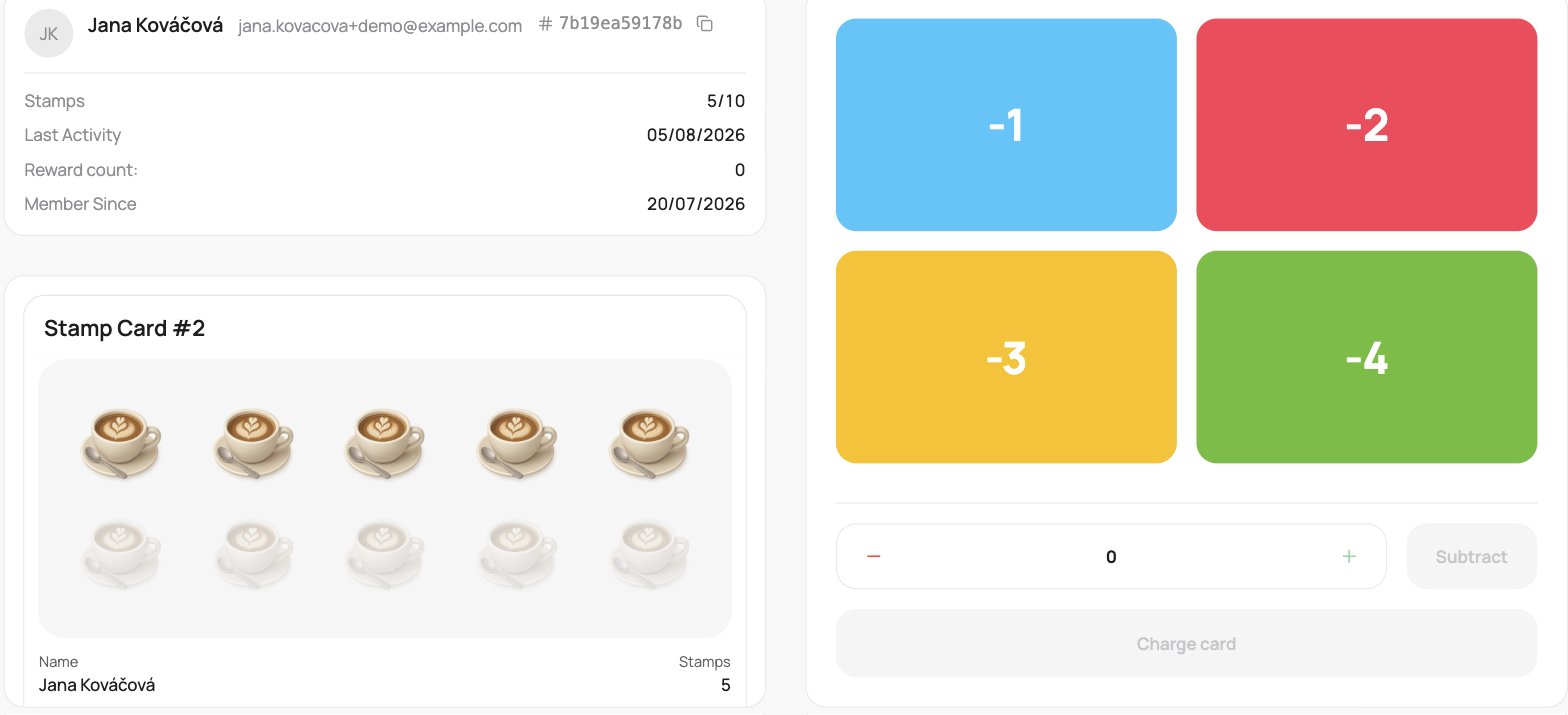
A stamp card with Paid in advance on works the opposite way to a normal stamp card: the customer pays up front for a full card, and you deduct stamps as they use them. Left panel: the customer’s remaining stamps (the Remaining row, for example 6), shown as a coloured tile on phones and as the top row on desktop. With it: Last visit and Reward count (how many full cards they have completed). On a phone that is all you see; desktop and landscape tablets also show Member since and a card preview.
A stamp card paid in advance on the scanner: the left panel shows how many of the pre-purchased stamps remain (5/10), and the right side has coloured tiles reading -1, -2, -3, -4 to spend stamps, a quantity stepper, and a Charge card button.

A stamp card paid in advance on the scanner

Deduct stamps

The four quick tiles read -1, -2, -3, -4. Tap one to remove that many stamps (the customer is spending what they prepaid). The custom stepper is subtract-only.

Recharge the card

When the card runs down to 0, the Charge card button becomes active. Tap it to reload the card to full, so you can sell the customer another prepaid round. It stays greyed out until the card is fully used.
For a normal (earn-as-you-go) stamp card, see Stamp cards on the scanner.